


As an editing tool, user should be able to import, save, preview, and print a document.
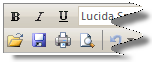
Import a document
When EnableDocumentImport property is set to True, Import command will be added to toolbar. When this command is clicked, OnToolBarClick client-side event will be invoked. Various actions can be manually implemented in this event to import a document to editor.
Save a document
When EnableDocumentSave property is set to True, Save command will be added to toolbar. When this command is clicked, WebTextEditor will perform FlyPostBack and invoke Save server side event. The editor content will be persisted during this action, so developer can easily grab and save the value and manually.
Print a document
When EnableDocumentPrint is set to True, Print command will be added to toolbar. When this command is clicked, user will be prompted to select which printer that will be used to print the content.
Preview a document
When ViewSettings >> AllowPreview is set to True, Preview command will be added to toolbar. When this command is clicked, the view will be switched to Preview mode, where user can preview the content.
In This Section
How-to: Import a document to WebTextEditor
How-to: Save a document to WebTextEditor
How-to: Print a document to WebTextEditor
How-to: Preview a document in WebTextEditor